
$0
For Windows 7, Vista, XP
FlashFlipBook3D PDF Editor - freeware
PDF Editing & Creation with dozens of powerful Settings
- FlashFlipBook3D PDF Editor supplies with 30+ PDF editing tool free for use.
- You can insert arrow, single and multiple line, image, hyperlink, graphic, mask, etc.
- Custom object color, size, pattern within sveral clicks.
- User-friendly API (Application Program Interface) sounds simple, reliable, and fast.
- The new PDF looks much better than old for those clear annotation elements..
- Absolutely open for all people who reform their old PDF files.
- Build stunning flippingbook publications form PDF, see PDF to Flipping Book Download
- Showcase
Freeware FlashFlipBook3D PDF Editor, you needn't pay for PDF editing anymore
FlashFlipBook3D PDF Editor is 100% free PDF editing & Creation tool with plenty of settings. A new PDF edited by it much better than the old one for it inserted with graphic and literal annotations. The content on the old PDF looks nice and readable.
Incredible Usability
FlashFlipBook3D PDF Editor owns a simple but high-usability API which leads to quick staring PDF editing and rebuild. Surprisingly, it is completely free for all but powerful. Any PDF can be the raw material within several clicks, a new stunning PDF born for varied uses. How amazing it is!
How it Work
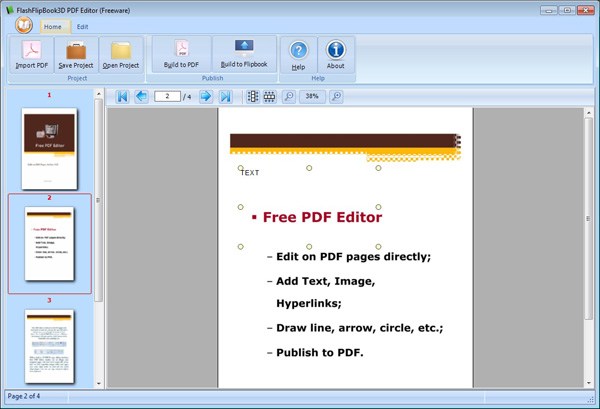
Just import a PDF in the program, and then insert image, hyperlink, rectangle, ellipse, and arrow, single and multiple line, etc. Also you can custom color, size and pattern freely. Finally build a new PDF on the base of the old PDF.

Insert Shape: Arrow, line, text, hyperlink, image, ellipse, and masking.
Font: dozens of font selections, 3 main align types of text, horizon and vertical test patterns.
Shape Style: object transparent and brush style.
Color and Line Style: Line and Brush color, line width and style (single or multiple).
Align Shape: left and top edge of PDF page, custom of object width and height.
Clipboard: Cut, Copy, Delete and Paste.
Edit: Undo and Redo.
Save Project for future use
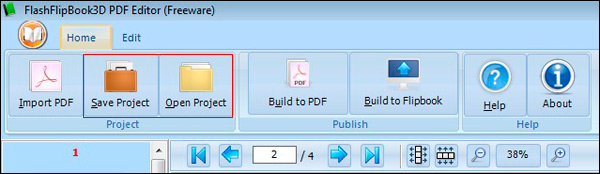
FlashFlipBook3D PDF Editor allows you preseve all the changes after you hit the options on the editing bar for later use. It can improve you work efficiency effectively.
- PDF to FlipBook 3D Standard
- Free Flipping Book Maker 3D
- Flipping Book 3D for Image
- Flipping Book 3D for Office
- Flipping Book 3D for Word
- Flipping Book 3D for PowerPoint
- Flipping Book 3D for Photographer
- Flipping Book 3D for OpenOffice
- Flipping Book 3D for Photo
- Free PDF to Flash
- Example